Cleva Download App
Cleva phone storage dashboard showing 440 GB used

Take Full Control of
Your Phone’s Storage

Experience the fastest way to organize your photo library and protect your digital life. One tap to scan, one tap to clean, zero clutter forever.

1.2M+Downloads on App Store
4.8Rating out of 5
Download App
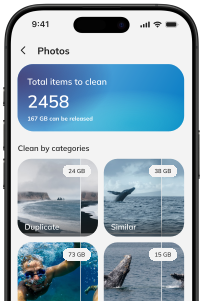
Cleva gallery scan showing duplicate and similar photo categories

Smart Scan & Clean

The Fastest Way to a Tidy Gallery

Stop wasting hours sorting through thousands of files manually. Our advanced scanning technology instantly categorizes your media, identifying blurry shots, large videos, and outdated screenshots that are eating up your storage. Review the results in seconds and reclaim gigabytes of space with just one tap.

Cleva duplicate contact organizer

Contact & Calendar Organizer

A Clutter-Free Address Book

Bring perfect order to your communication and schedule by merging identical contact entries and removing outdated events. This tool automatically finds duplicate phone numbers, incomplete profiles, and old calendar reminders that clutter your daily view. Keep your digital life organized and ensure you never lose a connection again.

Cleva security center showing protected device features

Advanced Security Shield

Total Privacy for Your Digital Life

Protect your most sensitive data from unauthorized access and prevent potential information leaks. Our comprehensive security center identifies device vulnerabilities and provides a secure vault for your private photos and videos. Rest easy knowing your personal library is shielded by a passcode and hidden from prying eyes.

FAQ

How does the app protect my phone?

Cleva checks important device security settings and helps you keep private photos and videos behind an additional passcode-protected layer.

Is the app safe to use?

Yes. Cleva asks only for the permissions required by the feature you choose, and you can review or revoke them in your device settings.

Do I need a subscription to use the app?

You can explore Cleva before subscribing. Some advanced cleanup and security tools may require a paid plan shown clearly in the app.

How can I cancel my subscription?

You can manage or cancel your subscription from your Apple ID subscription settings. Removing the app does not cancel an active subscription.

How do I request a refund?

App Store payments and refund requests are handled by Apple. Visit reportaproblem.apple.com and follow the steps for the Cleva purchase.

Get in Touch

Have questions?

We’d love to hear from you.

Send us a message and we’ll respond as soon as possible.

By sending this message, you agree to our Privacy Policy.